第8章: Validation / Logger / Cache のコスト ─ 静かに重い 3 層
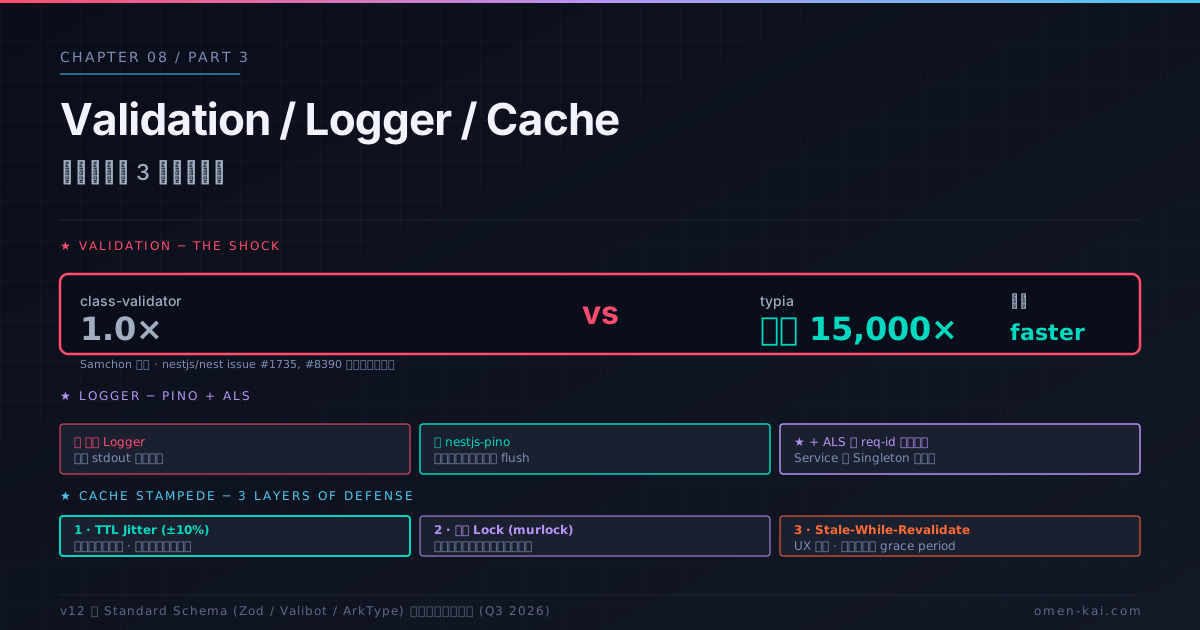
第7章で REQUEST scope 伝染を扱った。本章はもう 3 つの「静かに重い」層 ─ Validation / Logger / Cache ─ を分解する。どれも「動いている」状態でもプロダクション規模では桁違いのコストを生むことがある。
Validation:class-validator は typia 比 最大 15,000 倍遅い
NestJS の ValidationPipe は class-validator + class-transformer を使う。これは長らく標準だが、性能面で決定的に重いことが繰り返し指摘されている。
Samchon(typia 作者)の実測
class-validator vs typia ベンチ:
  - 単純オブジェクト: typia が 200倍速い
  - 複雑ネスト: typia が 5,000倍速い
  - 配列大量: typia が 最大 15,000倍速い

class-transformer vs JSON.stringify:
  - typia の JSON.stringify は最大 100倍速い
なぜそんなに遅いのか
class-validator は decorator 駆動 + reflect-metadata + 動的プロパティアクセス を多用する。
// class-validator が内部でやっていること(簡略)
function validate(target: any, schema: Constraint[]) {
  for (const constraint of schema) {
    const value = target[constraint.propertyName]; // ← 動的 key access
    // ... reflect-metadata で型情報を都度取得
    // ... 再帰的にネストを検証
  }
}
V8 は hidden class でオブジェクト構造を最適化するが、class-validator の動的 key allocation・for-in 走査は最適化を阻害する。
NestJS 公式が認識している
- nestjs/nest issue #1735:「
class-validator置き換え RFC」 - nestjs/nest issue #8390:「
class-transformerdeprecation 議論」 - 両ライブラリは長らく更新が滞っている
v12 で Standard Schema 対応(Zod / Valibot / ArkType を @Body() で直接使える)が予定されており、これが正面回答になる可能性がある。
移行戦略
Option A: nestjs-zod(最も低リスク)
import { ZodValidationPipe } from 'nestjs-zod';
import { z } from 'zod';

const CreateUserSchema = z.object({
  email: z.string().email(),
  age: z.number().int().min(18),
});

class CreateUserDto extends createZodDto(CreateUserSchema) {}

// 使う
app.useGlobalPipes(new ZodValidationPipe());

@Post()
create(@Body() dto: CreateUserDto) {} // ← Zod で検証される
利点:
- TypeScript first、推論が効く
- 単純なスキーマで
class-validator比数倍速い - メンテも活発
Option B: typia / Nestia(最高速度)
import { TypedBody, TypedRoute } from '@nestia/core';

@TypedRoute.Post()
create(@TypedBody() dto: CreateUserDto): UserResponse {
  return this.svc.create(dto);
}
// ↑ コンパイル時にバリデータを生成、runtime で 15,000倍速
利点:
- 最速(コンパイル時生成)
- 型がそのままバリデーションになる
注意:
- ビルドツールチェーンに
@nestia/sdkの組み込みが必要 - 学習コストが高い
Option C: 段階的移行
すべての DTO を一気に置き換えるのではなく、
- 新規コードから Zod / typia
- **ホットパス(最も呼ばれる endpoint)**を移行
- 残りは class-validator のまま
ホットパスのみ移行で全体性能の 80% を改善できることが多い。
移行しない場合の最適化
class-validator を続ける場合のチューニング:
// ❌ enableImplicitConversion はホットパスで重い
new ValidationPipe({ transformOptions: { enableImplicitConversion: true } });

// ✅ 必要な endpoint だけで明示的に @Type を付ける
class UserDto {
  @Type(() => Number) @IsInt() age: number;
}
// ❌ ネストを忘れて全テナント素通し
class CreateOrderDto {
customer: CustomerDto; // ← 検証バイパス!
}
// ✅ @ValidateNested + @Type が必須
class CreateOrderDto {
@ValidateNested() @Type(() => CustomerDto) customer: CustomerDto;
}whitelist + forbidNonWhitelisted はセキュリティ面で必須(過剰プロパティ攻撃の防止)だが、ネスト検証コストは O(深さ × プロパティ数)。
Logger:標準は同期 stdout、Pino で非同期化
標準 Logger の問題
NestJS の標準 ConsoleLogger は同期で stdout に書き込む。
// 概念的なイメージ
class ConsoleLogger {
  log(message: any) {
    process.stdout.write(formatMessage(message)); // ← 同期 I/O
  }
}
問題:
- 高スループット環境ではメインスレッドをブロック
- I/O が詰まると Event Loop が止まる
- JSON ではなく
inspectで文字列化するだけ(構造化ログにならない)
Pino + AsyncLocalStorage の Production パターン
// app.module.ts
import { LoggerModule } from 'nestjs-pino';

@Module({
  imports: [
    LoggerModule.forRoot({
      pinoHttp: {
        level: process.env.LOG_LEVEL ?? 'info',
        autoLogging: true,
        customProps: (req) => ({
          requestId: req.id,
          tenantId: req.headers['x-tenant-id'],
        }),
      },
    }),
  ],
})
export class AppModule {}

// main.ts
async function bootstrap() {
  const app = await NestFactory.create(AppModule, { bufferLogs: true });
  app.useLogger(app.get(Logger)); // ← bootstrap ログも Pino へ
  app.enableShutdownHooks();
  await app.listen(3000);
}

// service
@Injectable()
export class CatsService {
  constructor(@InjectPinoLogger(CatsService.name) private logger: PinoLogger) {}

  async findAll() {
    this.logger.info('finding all cats');
    // → ALS で requestId/tenantId が自動付与された JSON が出る
  }
}
Pino の核心:
- ワーカースレッドで flush(メインスレッドをブロックしない)
- JSON シリアライズ最適化
- pino-http が AsyncLocalStorage で req-id を child logger に bind
- transport なしの素 JSON stdout 出力にし、log aggregator 側で整形するのがProduction の定石
app.useLogger() を呼び忘れる典型ミス
// ❌ よくある間違い
const app = await NestFactory.create(AppModule);
// app.useLogger() を呼ばない
await app.listen(3000);
// ↑ NestJS bootstrap 時のログ("Nest application started" 等)が
//   標準 Logger(同期 stdout)のまま、Pino を経由しない
// ✅ 正しい
const app = await NestFactory.create(AppModule, { bufferLogs: true });
app.useLogger(app.get(Logger));
await app.listen(3000);bufferLogs: true を付けると、useLogger() が呼ばれるまでログがバッファされ、bootstrap ログも Pino を経由する。
Logger を Singleton Service に直接注入するアンチパターン(再掲)
第7章でも触れたが重要なので再掲:
// ❌ Request-scoped Logger を Singleton Service に
@Injectable({ scope: Scope.REQUEST })
export class RequestLogger { /* ... */ }

@Injectable() // ← DEFAULT のつもり
export class CatsService {
  constructor(private logger: RequestLogger) {} // ← Service 全体が REQUEST 化
}

// ✅ nestjs-pino + ALS なら Singleton のまま
@Injectable() // ← DEFAULT
export class CatsService {
  constructor(@InjectPinoLogger(CatsService.name) private logger: PinoLogger) {}
}
Cache:Stampede / Thundering Herd 対策
In-memory cache の落とし穴
// ❌ Pod を増やしたら破綻するパターン
@Injectable()
export class CacheService {
  private cache = new Map<string, any>(); // ← Pod ごとに別

  get(key: string) { return this.cache.get(key); }
}
PM2 cluster や K8s 複数 Pod ではプロセス分断される。整合性が必要なら Redis 必須。
Cache Stampede(Thundering Herd)
TTL 失効と同時に N 並列でキャッシュ再生成が走る典型問題。
graph TB
    T1[時刻 T: TTL expire]
    T1 --> R1[Request 1: cache miss]
    T1 --> R2[Request 2: cache miss]
    T1 --> R3[Request 3: cache miss]
    T1 --> RN[Request N: cache miss]
    R1 --> DB[DB 殺到]
    R2 --> DB
    R3 --> DB
    RN --> DB
    DB --> Down[DB がダウン]
    style DB fill:#1a2030,stroke:#ff4d6d
    style Down fill:#1a2030,stroke:#ff4d6d
対策1:TTL Jitter(最も簡単)
TTL に ±10% のランダム性を加えて失効時刻を分散。
// ❌ 全エントリが同時に失効
await cache.set(key, value, 60_000);

// ✅ Jitter で分散
const jitter = 60_000 + Math.floor(Math.random() * 6_000); // ±10%
await cache.set(key, value, jitter);
これだけで「同時失効による DB 殺到」が統計的にほぼ解消する。
対策2:分散ロック(厳密にやりたい場合)
「1 リクエストだけが再生成、他は stale を返すか短時間 wait」。
async getOrFetch(key: string, fetcher: () => Promise<any>) {
  const cached = await cache.get(key);
  if (cached) return cached;

  // ロックを取得
  const lock = await redis.set(`lock:${key}`, '1', 'NX', 'PX', 5000);
  if (!lock) {
    // 他のリクエストが再生成中、stale を返すか待つ
    await new Promise(r => setTimeout(r, 100));
    return await this.getOrFetch(key, fetcher);
  }

  try {
    const fresh = await fetcher();
    await cache.set(key, fresh, 60_000 + jitter());
    return fresh;
  } finally {
    await redis.del(`lock:${key}`);
  }
}
第6章で扱った murlock で書くと:
@MurLock(5000, 'key')
async regenerateCache(key: string) { /* fetcher logic */ }
対策3:Stale-While-Revalidate(SWR)
期限切れ後も短時間は古い値を返しつつ、バックグラウンドで更新する。
async getSWR(key: string, fetcher: () => Promise<any>) {
  const entry = await cache.get(key);
  const now = Date.now();

  if (entry && entry.expiresAt > now) {
    return entry.value; // 通常パス
  }

  if (entry && entry.expiresAt + 30_000 > now) {
    // stale だが grace period 内:返しつつ非同期更新
    this.refreshInBackground(key, fetcher);
    return entry.value;
  }

  // 完全に期限切れ:同期的に再生成
  return await this.refreshSync(key, fetcher);
}ユーザー体験をほぼ壊さず、DB 殺到を防ぐ。
3 つの対策の使い分け
| 対策 | 実装難度 | 効果 | 適合場面 |
|---|---|---|---|
| TTL Jitter | 低 | 中 | デフォルト、最初に入れる |
| 分散ロック | 中 | 高 | 重い再計算、厳密性必要 |
| Stale-While-Revalidate | 中-高 | 高 | UX 重視、頻繁アクセス |
TTL Jitter は無条件で入れる。これだけで多くのケースが解消する。
おまけ:BigInt シリアライズ問題
// ❌ BigInt を JSON.stringify するとエラー
JSON.stringify({ id: 9007199254740993n });
// → TypeError: Do not know how to serialize a BigInt

// ✅ replacer で文字列化
JSON.stringify(obj, (k, v) => typeof v === 'bigint' ? v.toString() : v);

// または BigInt.prototype.toJSON を生やす(global 変更注意)
(BigInt.prototype as any).toJSON = function() { return this.toString(); };
Prisma の BigInt フィールド・Snowflake ID 系で頻発。Interceptor で response 全体に replacer を当てる方式が定石。
✅ 良い構成 / ❌ 悪い構成(チェックリスト)
[Validation]
✅ 新規 endpoint は nestjs-zod / nestia
✅ class-validator のホットパスは段階的に移行
✅ ネストには @ValidateNested + @Type を必ず付ける
❌ 全 endpoint で enableImplicitConversion: true

[Logger]
✅ nestjs-pino + AsyncLocalStorage
✅ app.useLogger(app.get(Logger)) を main.ts で呼ぶ
✅ bufferLogs: true で bootstrap ログも Pino へ
✅ Service は Singleton、context は ALS
❌ 標準 Logger を本番運用
❌ Request-scoped Logger を Singleton に注入

[Cache]
✅ TTL Jitter を無条件で入れる
✅ 重い再計算には分散ロック(murlock)
✅ UX 重視は SWR
✅ 複数 Pod なら Redis
❌ in-memory Map cache を Pod 並列で運用
❌ TTL 単位を v6 で秒のままにする(ms に変更済み)
本章の要点
| # | 要点 |
|---|---|
| 1 | class-validator は typia 比 最大 15,000 倍遅い。NestJS 公式も置き換え検討中(issue #1735, #8390) |
| 2 | 移行戦略:nestjs-zod(低リスク、推論あり)/ typia/Nestia(最速、コンパイル時)/ 段階的(ホットパスから) |
| 3 | ネスト DTO は @ValidateNested() + @Type(() => Sub) の二点セットが必須、忘れると検証バイパス |
| 4 | 標準 Logger は同期 stdout、Pino はワーカースレッド flushで非同期 |
| 5 | nestjs-pino + AsyncLocalStorage で Singleton のまま req-id 自動付与、Service の REQUEST 化を回避 |
| 6 | bufferLogs: true + app.useLogger() を呼び忘れない(bootstrap ログを Pino に経由させるため) |
| 7 | Cache Stampede 対策:TTL Jitter は無条件、分散ロック、SWR の 3 段階 |
| 8 | TTL Jitter(±10%)だけでも統計的に DB 殺到をほぼ解消 |
| 9 | 複数 Pod では in-memory cache が分断、Redis 必須 |
効いている根本原理
本章は 原理4(メモリ効率は DI スコープ × ストリーム × Logger 設計に集約) が文字通りの章だった。Validation / Logger / Cache は静かに重い 3 層で、設計を一歩間違えると本番で初めて顕在化する。
ここまでで第3部「パフォーマンス・メモリ効率を上げる」は完了。次の第9章では、これまでの議論をアンチパターン 15 として集約し、「症状 → 根本原因 → 脱出法」の3段で識別できるようにする。