第6章: 再発明 TOP 10 ─ 自前実装をやめて準公式に寄せる
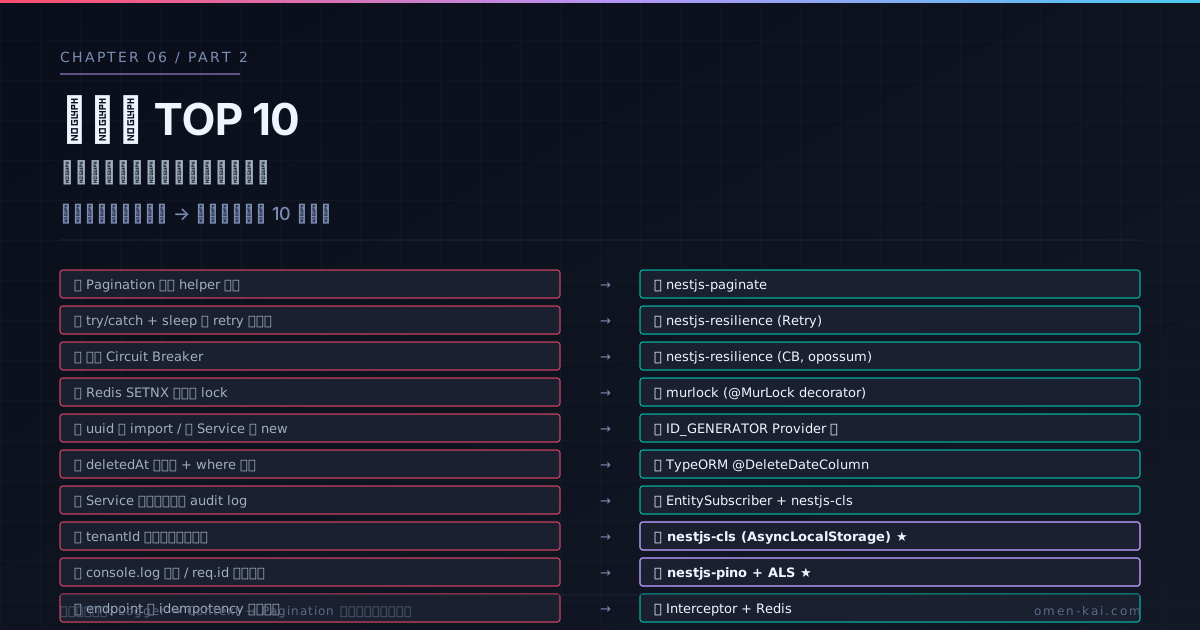
第5章で公式 18 モジュールを見た。本章はその外側 ─ 「公式に同等品はないが、業界に定着した準公式パッケージがある」領域を扱う。毎プロジェクト書き直している実装が、実は標準化されていることが多い。
「準公式」と呼ぶ基準:
- TypeScript first
- NestJS の DI / Decorator パターンに準拠
- 数千スターの GitHub リポジトリ、または NestJS 公式ドキュメントで言及
- 主要バージョン(v11)に追従
TOP 10 マップ
mindmap
  root((再発明 TOP 10))
    HTTP / API
      1 Pagination
      10 Idempotency
    Reliability
      2 Retry
      3 Circuit Breaker
      4 Distributed Lock
    Identity / Audit
      5 ID 生成
      6 Soft Delete
      7 Audit Log
    Context
      8 Tenant Context
9 Request-scoped Logger順に「自前実装パターン → 準公式の置き換え」の対比で見ていく。
1. Pagination → nestjs-paginate
自前実装あるある
// ❌ 毎プロジェクト書き直している
@Get()
async findAll(
  @Query('page') page = 1,
  @Query('limit') limit = 10,
  @Query('sortBy') sortBy = 'createdAt',
  @Query('order') order: 'asc' | 'desc' = 'desc',
) {
  const skip = (page - 1) * limit;
  const [data, total] = await this.repo.findAndCount({
    skip, take: limit,
    order: { [sortBy]: order },
  });
  return { data, meta: { page, limit, total, totalPages: Math.ceil(total / limit) } };
}
毎回書く。Swagger 記述も毎回書く。カーソルベースに切り替えたくなったら全部書き直し。
nestjs-paginate
import { Paginate, PaginateQuery, paginate, PaginateConfig } from 'nestjs-paginate';

const CONFIG: PaginateConfig<Cat> = {
  sortableColumns: ['id', 'name', 'createdAt'],
  searchableColumns: ['name', 'breed'],
  defaultSortBy: [['createdAt', 'DESC']],
  filterableColumns: { breed: [FilterOperator.EQ, FilterOperator.IN] },
};

@Get()
@PaginatedSwaggerDocs(CatDto, CONFIG) // ← Swagger 自動
async findAll(@Paginate() query: PaginateQuery) {
  return paginate(query, this.repo, CONFIG);
}- offset / cursor 両対応
- フィルタ(
?filter.breed=$eq:Persian)・ソート(?sortBy=name:ASC)・全文検索が標準 - Swagger 自動生成(
@PaginatedSwaggerDocs()) - 数千行の自前 Pagination Helper が数行に縮む
2. Retry → nestjs-resilience
自前実装あるある
// ❌ try/catch + sleep ループ
async callExternalApi() {
  let lastError;
  for (let i = 0; i < 3; i++) {
    try {
      return await fetch('...').then(r => r.json());
    } catch (e) {
      lastError = e;
      await new Promise(r => setTimeout(r, 1000 * Math.pow(2, i))); // 自前 backoff
    }
  }
  throw lastError;
}
エクスポネンシャルバックオフ・ジッタ・最大遅延・特定エラーのみリトライ ─ 毎回書く。
nestjs-resilience
import { ResilienceModule, RetryStrategy } from 'nestjs-resilience';

@Injectable()
export class ExternalApiService {
  @UseResilience(
    new RetryStrategy({
      maxRetries: 3,
      shouldRetry: (e) => e.statusCode >= 500,
      backoffStrategy: new ExponentialBackoffStrategy({ initialDelay: 1000, maxDelay: 10000 }),
    }),
  )
  async callExternalApi() {
    return await fetch('...').then(r => r.json());
  }
}- Decorator で宣言的
shouldRetryで再試行条件を細かく制御- ジッタ付き exponential backoff
- 後述の Circuit Breaker と同じパッケージ
3. Circuit Breaker → nestjs-resilience(opossum ラッパ)
import { CircuitBreakerStrategy } from 'nestjs-resilience';

@UseResilience(
  new CircuitBreakerStrategy({
    timeout: 3000,
    errorThresholdPercentage: 50,
    resetTimeout: 30000,
  }),
)
async callPaymentApi() { /* ... */ }
Circuit が open になっている間は外部呼び出しをスキップして、定期的に half-open で試す古典的パターン。opossum ベース。Retry と組み合わせて層を作るのが定石。
4. Distributed Lock → murlock
自前実装あるある
// ❌ Redis SETNX を直接書く
async processOrder(orderId: string) {
  const lock = await redis.set(`lock:${orderId}`, '1', 'NX', 'PX', 5000);
  if (!lock) throw new ConflictException('Already processing');
  try {
    return await this.process(orderId);
  } finally {
    await redis.del(`lock:${orderId}`);
  }
}正しくRedlock アルゴリズムを実装するのは難しい。
murlock
import { MurLockModule, MurLock } from 'murlock';

@Injectable()
export class OrderService {
  @MurLock(5000, 'orderId') // ← 5秒の lock、orderId を key に
  async processOrder(orderId: string) {
    return await this.process(orderId);
  }
}
Decorator で宣言的。Redis Redlock ベース。lock 取得失敗時は MurLockException。
5. ID 生成 → uuid / ulid を Provider 化
自前実装あるある
// ❌ 直接 import、テストでモック化困難
import { v4 as uuidv4 } from 'uuid';

@Injectable()
export class CatService {
  create(name: string) {
    return { id: uuidv4(), name }; // ← 直書き、テストで時刻順序を制御できない
  }
}
Provider 化
// id.provider.ts
export const ID_GENERATOR = 'ID_GENERATOR';

@Module({
  providers: [
    { provide: ID_GENERATOR, useValue: { generate: () => randomUUID() } },
  ],
  exports: [ID_GENERATOR],
})
export class IdModule {}

// service
@Injectable()
export class CatService {
  constructor(@Inject(ID_GENERATOR) private idGen: { generate: () => string }) {}
  create(name: string) {
    return { id: this.idGen.generate(), name };
  }
}

// test
{ provide: ID_GENERATOR, useValue: { generate: () => 'fixed-uuid-1' } }これだけでテストが決定論的になる。ulid / nanoid への切り替えも 1 箇所で済む。
6. Soft Delete → TypeORM @DeleteDateColumn / Prisma 拡張
自前実装あるある
// ❌ deletedAt を全クエリで if 文
@Entity()
class Cat {
  @PrimaryGeneratedColumn() id: number;
  @Column({ nullable: true }) deletedAt: Date | null;
}

// 全クエリで where 条件追加
const cats = await repo.find({ where: { deletedAt: IsNull() } });「忘れた瞬間に削除済みデータが見える」事故が多発。
TypeORM @DeleteDateColumn
@Entity()
class Cat {
  @PrimaryGeneratedColumn() id: number;
  @DeleteDateColumn() deletedAt: Date | null;
}

// 削除
await repo.softDelete(id); // deletedAt が自動セット
await repo.softRemove(cat);

// 取得(deletedAt is null が自動付与)
const cats = await repo.find();

// 削除済みも含める
const all = await repo.find({ withDeleted: true });

// 復元
await repo.restore(id);全クエリでの自動フィルタが標準で効く。Prisma も拡張で同等のことができる。
7. Audit Log → TypeORM EntitySubscriber or NestJS Interceptor + CLS
自前実装あるある
// ❌ Service 内で audit log を毎回呼ぶ
@Injectable()
export class CatService {
  async update(id: number, dto: UpdateCatDto, userId: string) {
    const before = await this.repo.findOne(id);
    const after = await this.repo.update(id, dto);
    await this.auditLog.record({ userId, entity: 'Cat', id, before, after }); // ← 毎メソッド
    return after;
  }
}
Service の責務が肥大化、忘れる箇所も出る。
TypeORM EntitySubscriber
@EventSubscriber()
export class AuditSubscriber implements EntitySubscriberInterface {
  afterUpdate(event: UpdateEvent<any>) {
    const userId = ClsServiceManager.getClsService().get('userId'); // ← AsyncLocalStorage
    auditLogger.record({
      userId,
      entity: event.metadata.name,
      id: event.entity.id,
      before: event.databaseEntity,
      after: event.entity,
    });
  }
}
DB レイヤで横断的に拾う。Service コードに audit の存在が出てこない。CLS と組み合わせると userId も自動で取れる。
8. Tenant Context → nestjs-cls(AsyncLocalStorage)
自前実装あるある
// ❌ tenantId を全 Service メソッドの引数で引き回す
@Get(':id')
async findOne(@Param('id') id: number, @Req() req) {
  return this.svc.findOne(id, req.tenantId); // ← 引数追加
}

// ❌ または REQUEST scope で注入(伝染問題)
@Injectable({ scope: Scope.REQUEST })
export class TenantContext {
  constructor(@Inject(REQUEST) private req: Request) {}
  get tenantId() { return this.req.tenantId; }
}
// ↑ これを使う Service / Controller も全て REQUEST スコープに伝染
nestjs-cls
// app.module.ts
ClsModule.forRoot({
  global: true,
  middleware: {
    mount: true,
    setup: (cls, req) => cls.set('tenantId', req.headers['x-tenant-id']),
  },
});

// service(Singleton のまま)
@Injectable()
export class CatService {
  constructor(private cls: ClsService) {}
  async findAll() {
    const tenantId = this.cls.get('tenantId'); // ← AsyncLocalStorage 経由
    return this.repo.find({ where: { tenantId } });
  }
}
Service は Singleton のままで、AsyncLocalStorage 経由で request context が取れる。REQUEST scope 伝染を回避する2026年の現実解。第7章で詳しく扱う。
9. Request-scoped Logger → nestjs-pino
自前実装あるある
// ❌ Request ID を引数で引き回す
@Get(':id')
async findOne(@Param('id') id: number, @Req() req) {
  this.logger.log({ requestId: req.id, id }, 'finding cat');
}

// ❌ または REQUEST scope の Logger(伝染問題)
@Injectable({ scope: Scope.REQUEST })
export class RequestLogger { /* ... */ }
nestjs-pino + AsyncLocalStorage
// app.module.ts
LoggerModule.forRoot({
  pinoHttp: {
    autoLogging: true,
    customProps: (req) => ({ requestId: req.id }), // ← 自動付与
  },
});

// service(Singleton のまま)
@Injectable()
export class CatService {
  constructor(@InjectPinoLogger(CatService.name) private logger: PinoLogger) {}
  async findOne(id: number) {
    this.logger.info({ id }, 'finding cat');
    // ↑ pino-http が AsyncLocalStorage 経由で requestId を自動付与
  }
}- Pino がワーカースレッドで flush(同期 stdout を回避)
requestIdが全ログに自動付与- Service は Singleton のまま
第8章でパフォーマンス面を深掘り。
10. Idempotency → Interceptor + Redis
自前実装あるある
// ❌ Service / Controller で if 文
@Post()
async create(@Body() dto: CreateOrderDto, @Headers('x-idempotency-key') key: string) {
  if (key) {
    const cached = await redis.get(`idem:${key}`);
    if (cached) return JSON.parse(cached);
  }
  const order = await this.svc.create(dto);
  if (key) await redis.set(`idem:${key}`, JSON.stringify(order), 'EX', 86400);
  return order;
}
毎エンドポイントに同じコードを書く。
Interceptor + Redis(公開実装多数)
@Injectable()
export class IdempotencyInterceptor implements NestInterceptor {
  constructor(@Inject(CACHE_MANAGER) private cache: Cache) {}

  async intercept(ctx: ExecutionContext, next: CallHandler) {
    const req = ctx.switchToHttp().getRequest();
    const key = req.headers['x-idempotency-key'];
    if (!key) return next.handle();

    const cached = await this.cache.get(`idem:${key}`);
    if (cached) return of(cached);

    return next.handle().pipe(
      tap(async (result) => {
        await this.cache.set(`idem:${key}`, result, 86400_000);
      }),
    );
  }
}

// 使う側
@UseInterceptors(IdempotencyInterceptor)
@Post()
create(@Body() dto: CreateOrderDto) {
  return this.svc.create(dto);
}
@UseInterceptors() を 1 行付けるだけ。Service / Controller のコードがクリーンに保たれる。
TOP 10 早見表
| # | 自前実装パターン | 準公式パッケージ | 置換難度 |
|---|---|---|---|
| 1 | 自前 Pagination Helper | nestjs-paginate | 低 |
| 2 | try/catch + sleep ループ | nestjs-resilience (Retry) | 低 |
| 3 | 自前 Circuit Breaker | nestjs-resilience (CB) | 中 |
| 4 | Redis SETNX 直書き | murlock | 低 |
| 5 | uuid 直 import | Provider 化(自前 1 module) | 低 |
| 6 | deletedAt 手書き | TypeORM @DeleteDateColumn | 低 |
| 7 | Service 内 audit ログ呼び出し | TypeORM Subscriber + CLS | 中 |
| 8 | tenantId を引数で引き回す | nestjs-cls | 中 |
| 9 | console.log + req.id | nestjs-pino + ALS | 低 |
| 10 | エンドポイント毎 idempotency | Interceptor + Redis | 低 |
「自前で書きがち」を見分けるサイン
社内コードレビューで以下のパターンを見たら、ほぼ「再発明」だ:
- ✅
Map<string, ...>を Service の field に持っている → CacheModule - ✅
setIntervalで何かを定期実行している → ScheduleModule - ✅
try { ... } catch { sleep + retry }のループ → nestjs-resilience - ✅
req.tenantIdを関数引数で引き回している → nestjs-cls - ✅
console.logか独自 Logger class → nestjs-pino - ✅ Service メソッドの末尾で
auditLog.record()を呼んでいる → EntitySubscriber + CLS - ✅
if (page) { skip = ... }を毎エンドポイント → nestjs-paginate - ✅ Service 内で
try-catchでHttpException整形 → ExceptionFilter - ✅ Decorator メタデータを直接
Reflect.getMetadataで読んでいる → Reflector - ✅ DI で取れるものを
newしている → DI 設計の見直し
移行戦略 ─ 一度に全部やらない
15 個全部を一気に置き換えると失敗する。優先度:
- Logger → nestjs-pino(最も低コスト、効果大)
- Tenant Context → nestjs-cls(REQUEST scope 伝染を解消、第7章で詳述)
- Pagination → nestjs-paginate(毎エンドポイントの Boilerplate 消滅)
- Idempotency → Interceptor(POST が増えてきたら)
- Retry / Circuit Breaker → nestjs-resilience(外部 API 連携が増えてきたら)
- Distributed Lock → murlock(Redis を既に使っているなら)
「今書いている機能の実装中に既に類似コードを 2 回書いた」と気づいた瞬間が、置き換えのタイミング。
本章の要点
| # | 要点 |
|---|---|
| 1 | NestJS 公式に同等品はないが、業界に定着した準公式パッケージで再発明を回避できる領域が 10 個ある |
| 2 | nestjs-pino + nestjs-cls は Logger と Context の組み合わせで最も価値が高い(次章で性能面も) |
| 3 | nestjs-paginate は Pagination Helper の毎プロジェクト書き直しを終わらせる |
| 4 | nestjs-resilience は Retry / Circuit Breaker / Timeout を Decorator で宣言できる |
| 5 | murlock は Redis Redlock を Decorator で扱える |
| 6 | TypeORM @DeleteDateColumn / EntitySubscriber は Service コードを変えずに横断機能を追加する手段 |
| 7 | 移行は段階的に。Logger → Context → Pagination の順で効果が大きい |
| 8 | 「Map を Service field に持つ / setInterval 直書き / req.tenantId を引き回す」等のサインはほぼ再発明 |
効いている根本原理
本章は 原理1(DI コンテナを信頼する) + 原理4(メモリ効率は DI スコープ × ストリーム × Logger に集約) を実装に落とした章だった。「自前で書く」のではなく「DI で受け取る・準公式に寄せる」が原則。
ここまでで第2部「再発明していないか棚卸しする」は完了。次の第3部からパフォーマンス・メモリ効率に入る。第7章では本章で何度も登場した REQUEST scope 伝染を、Durable Providers と nestjs-cls の比較で深掘りする。